
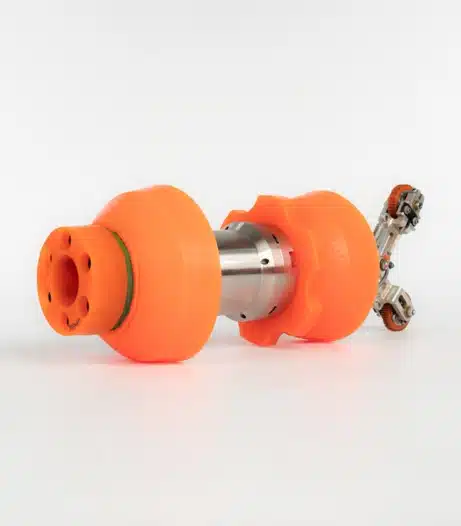
A pipeline caliper tool is essential for verifying pipeline geometry and preparing lines for inline inspections. However, when tools are rented, rushed into service, or used by multiple operators, mistakes can happen. Even small errors, such as skipped calibration checks or incorrect data interpretation, can compromise inspection accuracy and affect overall pipeline geometry inspection results.
Because a pipeline caliper tool is often used to verify smart PIG readiness and identify restrictions, inaccurate readings can lead to failed inspection runs, costly rework, and incorrect assumptions about pipeline conditions. Understanding the most common mistakes helps operators improve data quality and maintain reliable pipeline geometry tools performance.
Skipping or Improperly Performing Calibration
One of the most common mistakes when using a pipeline caliper tool is improper calibration.
A pipeline caliper tool is only as accurate as its setup process. When operators skip calibration or rush through the procedure, the resulting data may appear correct while actually containing significant inaccuracies. This can negatively impact pipeline geometry inspection programs and create misleading inspection results.
Why this happens:
- Operators assume previous settings are still accurate
- The tool was previously used in a different pipe size or environment
- Calibration procedures are overlooked during busy operations
Why calibration matters:
Operators depend on a properly calibrated pipeline caliper tool to verify pipeline geometry before launching inline inspection tools. Even small calibration errors can affect measurements and compromise downstream inspection programs.
How to avoid this mistake:
- Follow calibration procedures before every run
- Use step-by-step setup guides
- Document calibration checks for QA/QC purposes
- Assign calibration responsibility to trained personnel
Proper calibration improves the reliability of both pipeline geometry inspection results and overall inspection readiness.
Misinterpreting Digital Readouts and Inspection Data
Another common issue with a pipeline caliper tool occurs when operators misinterpret digital outputs or geometry graphs.
Modern pipeline geometry tools provide detailed information about:
- Dents
- Ovalities
- Restrictions
- Deformation patterns
Without proper understanding, operators may incorrectly identify normal conditions as defects, or overlook larger integrity concerns during pipeline geometry inspection.
Common interpretation mistakes:
- Confusing acceptable anomalies with critical defects
- Misreading graph scales or measurement increments
- Assuming all high or low points indicate severe damage
A pipeline caliper tool focuses on geometry and restrictions, not corrosion or wall loss. Understanding this distinction is important during inspection planning.
How to avoid this mistake:
- Provide basic interpretation training
- Compare current runs with historical inspection data
- Encourage teams to review questionable results carefully
- Use summary outputs before reviewing raw graphs
Clear interpretation improves confidence in pipeline geometry inspection data and reduces unnecessary operational delays.
Neglecting Maintenance During Rental Use
Although rugged and designed for industrial use, a pipeline caliper tool still requires basic maintenance. Failing to clean or inspect the tool can affect performance and reduce data accuracy.
Common maintenance issues:
- Debris buildup on moving parts
- Dirty sensors
- Battery failures
- Improper storage conditions
Poor maintenance practices can impact both pipeline geometry tools and the quality of inspection data collected during runs.
How to avoid this mistake:
- Clean the tool after every inspection run
- Inspect for loose or damaged components
- Store equipment in a dry environment
- Keep spare batteries or charging systems available
Routine maintenance helps ensure the pipeline caliper tool continues operating reliably.
Lack of Operator Training
One of the biggest contributors to inaccurate pipeline geometry inspection results is insufficient operator training. Rental equipment is often shared across multiple crews, increasing the likelihood of setup and operational mistakes.
Even user-friendly pipeline geometry tools require operators to understand:
- Proper setup procedures
- Calibration requirements
- Data collection methods
- Output interpretation
A small setup error can invalidate an entire inspection run.
How to avoid this mistake:
- Provide quick-reference setup guides
- Request demonstrations from the rental provider
- Conduct short training sessions before deployment
- Keep digital instructions accessible onsite
Proper training significantly improves pipeline caliper tool performance and inspection reliability.
Supporting Better Pipeline Geometry Inspection Results
Avoiding common pipeline caliper tool mistakes requires consistent calibration, proper maintenance, and clear operator training. Accurate geometry data plays a critical role in inspection readiness and helps operators avoid costly delays and re-runs.
Winterhawk Pipeline Services provides reliable pipeline geometry tools and Digi-Cal solutions designed to support accurate, dependable pipeline geometry inspection programs. With the right preparation and operational practices, operators can improve inspection efficiency and confidence in every run.